Stroke patients with weak arms often train on a table-top with an arm skateboard. They rest their forearm on a small board with wheels, which takes the weight of the arm, and practise moving the shoulder and elbow. At CMC Vellore this training was done without any feedback on the movement itself.
Tracking the skateboard would make feedback, and games, possible. A marker-based motion capture system tracks it very accurately, but it’s expensive and needs a dedicated room. A printed ArUco marker and an ordinary camera cost almost nothing. The question is whether they’re good enough.
This was part of the CMC Vellore project at NeuroRehack21, a multi-institution event that ran from June to July 2021. I worked on it with Arjun Ram.
Code: Zilch123/Aruco-3D-position-Validation
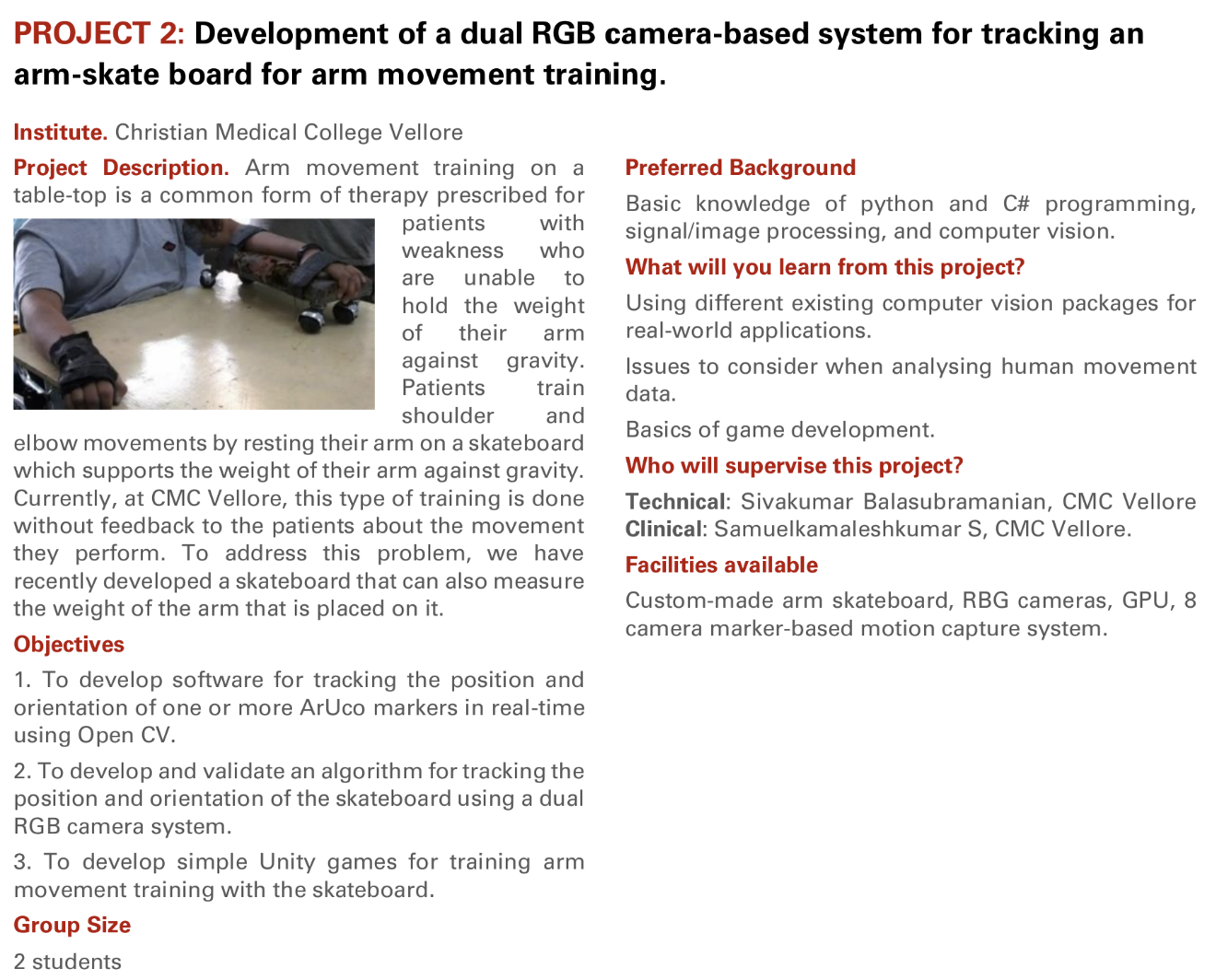
The project’s end goal was a dual RGB camera system. Before building that, we needed to know how well ArUco tracking holds up against a trusted reference, so this was the first validation step.
The setup
An ArUco marker is a black and white square pattern, like a simple QR code. OpenCV can detect it in an image and estimate its 3D position and orientation relative to the camera.
We put a marker on the skateboard and recorded a session with a Kinect and the motion capture system at the same time. That gave three estimates of where the skateboard was:
| Source | How the position is measured |
|---|---|
| ArUco | Marker pose estimated from the Kinect’s RGB image |
| Kinect depth | 3D point from the depth camera at the marker’s centre pixel |
| Motion capture | 8-camera marker-based system tracking the skateboard (the reference) |
Getting the ArUco position
For each frame, detect the marker, estimate its pose, and take the translation vector as the marker’s position:
corners, ids, rejectedImgPoints = aruco.detectMarkers(gray, dictionary=ARUCO_DICT, parameters=ARUCO_PARAMETERS)
corners, ids, rejectedImgPoints, recoveredIds = aruco.refineDetectedMarkers(
    image = gray,
    board = board,
    detectedCorners = corners,
    detectedIds = ids,
    rejectedCorners = rejectedImgPoints,
    cameraMatrix = cameraMatrix,
    distCoeffs = distCoeffs)

if ids is not None and len(ids) > 0:
    rotation_vectors, translation_vectors, _objPoints = aruco.estimatePoseSingleMarkers(corners, marker_size, cameraMatrix, distCoeffs)
The marker’s centre pixel is also used to read the Kinect’s depth map at the same spot, which gives the Kinect depth estimate.
Putting everything in the same frame
The camera sees the table at an angle, so its x, y and z don’t match the table’s axes. A calibration gives the table’s origin and a rotation matrix, and every camera point is moved into table coordinates:
def kinect2table(orig,R_T,kinect_joint):
    Local_co = [np.matmul(R_T.T,(x-orig).T) for x in kinect_joint]
    return(np.array(Local_co).squeeze())
Syncing the recordings
The Kinect and the motion capture system were started separately, so their clocks don’t line up. Both log a start timestamp, and the difference between them (2.1 seconds in this recording) shifts the mocap data onto the Kinect’s timeline. The two are then matched on time, rounded to 10 ms.
Cleaning the signals
Before comparing, each signal is:
- Zeroed at the first frame, so all three start from the same point.
- Smoothed with a Savitzky-Golay filter.
- Cleaned of outliers, by dropping frames more than 3 standard deviations from the mean.
kinect_mocap[11] = kinect_mocap[1] - kinect_mocap[1].loc[0].values.squeeze()

# savgol filter
kinect_mocap[11] = kinect_mocap[11].apply(my_filter)
# Outlier Removal
kinect_mocap[11] = kinect_mocap[11][(np.abs(stats.zscore(kinect_mocap[11])) < 3).all(axis=1)]
Results
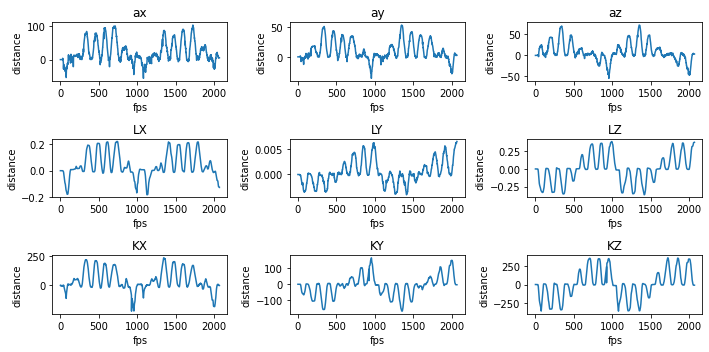
The movement patterns line up well. The peaks and troughs from the subject’s repeated arm movements happen at the same time in all three systems, especially on the x and z axes, where most of the movement on the table happens.
Two things to keep in mind:
- The units aren’t aligned yet. Each system reports position in its own units, so the plot compares the shape and timing of the movement, not absolute distances.
- The y axis is mostly noise in the mocap data. The skateboard stays flat on the table, so there’s very little movement on that axis to compare.
What’s next
Visual agreement is a good start, but it isn’t a validation. The next steps are:
- Convert all three systems to the same units and check that the axes match.
- Compute the correlation and RMSE between ArUco and motion capture on each axis.
- Run a Bland-Altman analysis to see whether the error is constant or changes across the range of movement.
- Repeat with more subjects and sessions.
If ArUco holds up, it means a printed marker and a regular camera could give patients movement feedback without a motion capture lab.