RAG workshop series. I prepared these notebooks for the RAG day of AI Innovation & Product Development, a three-day workshop I ran for final-year B.Tech AI & Data Science students.
- When to use RAG, and when a long context window is enough
- Basic RAG from scratch
- Hybrid search: BM25, embeddings and a reranker
- RAG on real documents: query rewriting, chunking, metadata and Chroma
- Agentic RAG: corrective, adaptive and ReAct
All notebooks: github.com/Zilch123/ai-workshop
The workshop
This year I ran the final-year module of a skill development program by AIC-PECF (the Atal Incubation Centre at Pondicherry Engineering College Foundation) for AKT Memorial College of Engineering and Technology. The module was called AI Innovation & Product Development, and it ran for three days:
- Day 1: RAG, from a 20-line retriever up to an agent that decides when to search.
- Day 2: using a coding agent to build software, and checking what it writes.
- Day 3: a hands-on build of a proof-of-concept web app.
The students were in their final year of B.Tech in AI & Data Science, so they knew the ML theory. What they hadn’t done much was build an LLM application end to end. The RAG day was all Colab notebooks, and this series is a write-up of them.
The notebooks used a small open model (Llama 3.1 8B Instruct, served by Nscale through the OpenAI Python client) and small local models for embeddings and reranking. Everything runs on a free Colab instance.
Is RAG dead?
This question always comes up. Models now accept hundreds of thousands, even a million, tokens. Why not paste every document into the prompt and skip retrieval?
Two reasons.
Long context isn’t the same as good use of long context. A model that accepts a million tokens doesn’t use all of them equally well. The NoLiMa benchmark shows that models get much worse at finding a fact as the context grows, especially when the fact doesn’t share obvious words with the question. A short, relevant context still beats a long, noisy one.
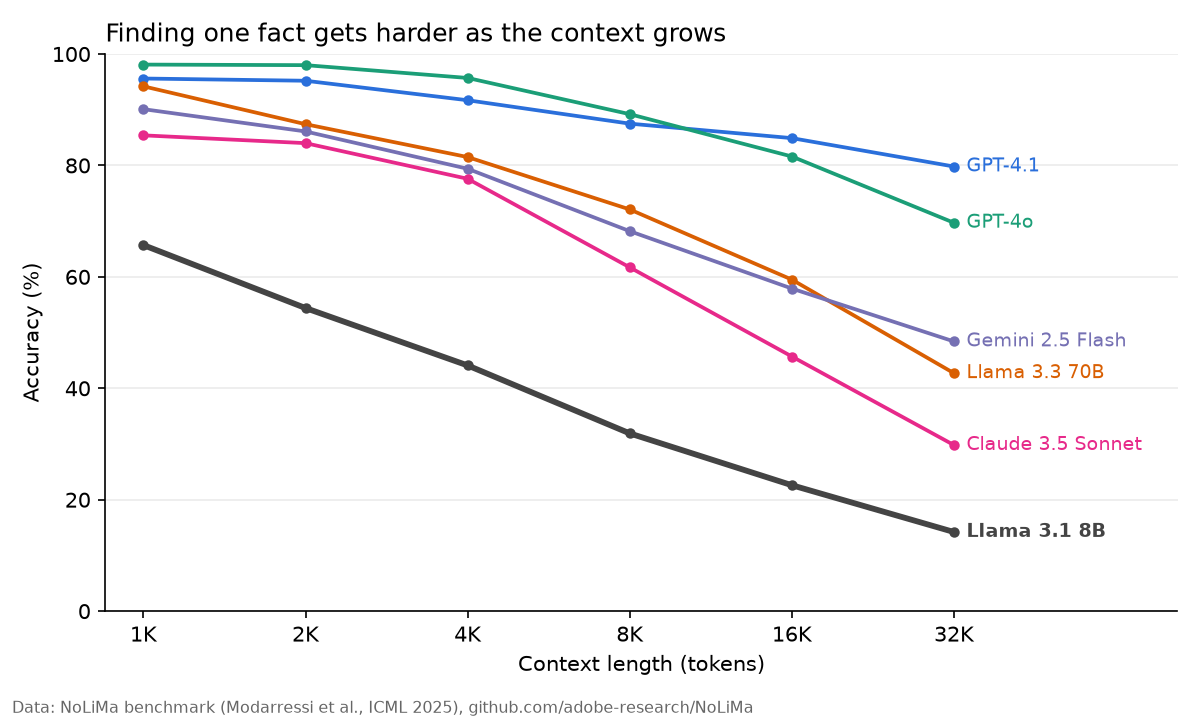
Most of these models claim to support 128K tokens or more. At 32K, half of the ones shown here are below 50% accuracy.
Retrieval does jobs a prompt can’t. It picks the right 3 chunks out of 10,000 tickets. It lets you cite a source. It lets you filter by who is allowed to see what.
What has changed is how often RAG is the right call. A few years ago every chatbot demo had a vector database behind it. Now, in enterprise systems, RAG is used only where retrieval is actually part of the problem.
An engineer doesn’t just know how to use a tool. They know when to use it.
A simple decision table
This is the table I gave the students. The question to ask is: do I already know where the answer is? If yes, you probably don’t need retrieval.
Usually not worth it (use long context or load the file directly):
- Find a clause in one known contract
- Summarise one document
- Answer questions over a few documents that fit comfortably in the context
- Explain a known file or module in a codebase
- Extract fields from a known PDF or form
- Reason over a few sources you’ve already picked
Maybe (try long context first):
- Compare 5 to 10 known documents. RAG helps only if they’re too big.
- A corpus that fits in context but is mostly irrelevant. Retrieving first improves the signal-to-noise ratio.
- Searching a large codebase for a concept. You need search, but grep or BM25 often beats vectors.
Worth it:
- A large knowledge base where you don’t know where the answer is
- Thousands of support tickets or contracts where only a few are relevant
- Finding similar incidents or cases where the wording differs
- Documents that change often, or facts newer than the model’s training data
- Answers that need citations
- Enterprise data with per-user or per-document permissions (RAG plus access filtering)
- Legal and compliance knowledge bases, where provenance matters
- Very large corpora where sending everything would cost too much
RAG alone isn’t enough:
- Live or structured data from databases and APIs. Fetch it with a tool, not a vector search.
- Exact identifiers and error codes. Keyword search (grep, SQL, BM25) usually wins here. Part 3 covers this.
What’s next
Part 2 builds the simplest possible RAG pipeline from scratch: chunk, embed, compare, prompt. No framework and no vector database, so every step is visible.
Notebook: rag_when_to_use.ipynb